Categories
Archives
schema.org is the technology used by web site owners around the world to make metadata available to search engines and other third-party services. It is widely used to embed machine-readable data in websites for products, store opening times and much more.
It is also used as one of the sources of metadata for the Google search results. The schema.org “license”, “acquireLicensePage” and “creator” properties in a page’s HTML code are used in addition to IPTC Photo Metadata embedded in image files to populate the image panel.
schema.org version 11 was released this week. It contains two new properties on the CreativeWork type (and therefore its subtypes such as ImageObject) that were created to match their equivalent properties in IPTC Photo Metadata: copyrightNotice, which matches the IPTC Photo Metadata Copyright Notice property, and creditText, which matches the IPTC Photo Metadata Credit Line property.
The new fields are not yet supported by Google images search, but hopefully will be soon.
After the recent update, the current properties mapped to schema.org and used in Google images search results are:
| IPTC Photo Metadata property | Matching schema.org property | Used in Google search results? |
| Creator | ImageObject -> creator | Yes |
| Copyright Notice | ImageObject -> copyrightNotice | Not yet |
| Credit Line | ImageObject -> creditText | Not yet |
| Web Statement of Rights | ImageObject -> license | Yes |
| Licensor / Licensor URL | ImageObject -> acquireLicensePage | Yes |
The IPTC Photo Metadata Working Group is working on a more comprehensive document showing all possible IPTC Photo Metadata fields with their schema.org and EXIF equivalents. The full mapping document will be released soon.
 Bill Kasdorf, principal at Kasdorf & Associates and individual member of IPTC, has published his latest column at Publishers Weekly, “News You Can Use”, where he promotes IPTC standards including IPTC Photo Metadata and IPTC Media Topics.
As Bill says, “I recently attended the IPTC Autumn Meeting, and at virtually every session, I thought, “People in other sectors of publishing ought to know about what the IPTC has to offer them.”
Bill goes on to discuss IPTC’s work with Google on exposing IPTC Photo Metadata in Google search results and the Licensable Images feature in Google Images search, explaining how those in the publishing industry can use those features to find out who owns the copyright on an image they might want to re-use, and how to obtain a license to use it.
He also talks about IPTC’s Media Topics subject taxonomy, and how publishers could use it for press releases, so they can “be sure the terms you use are the ones the news industry itself uses”.
You can view the article on the Publisher’s Weekly website.
Thanks Bill for sharing your thoughts and for promoting the IPTC cause!
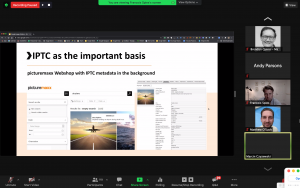
We’re very happy that we can make public some of the video recordings from the recent IPTC Photo Metadata Conference 2020, held on Tuesday 13 October 2020.
Thanks to all who attended – we had over 200 registrations for the webinar.
The videos are embedded below or can be viewed directly on YouTube by following the link above the embedded video.
Introduction
Brendan Quinn, Managing Director of IPTC, opened the day with an introduction to IPTC and an overview of what was to come (10 minutes):
Michael Steidl, Photo Metadata WG lead on IPTC Photo Metadata
Michael Steidl presented on why we should care about photo metadata in his presentation “About IPTC Photo Metadata” (48 minutes including Q&A)
Google’s Licensable Images features
Francois Spies, a Product Manager for Google Images in Mountain View, presented on the Licensable Images features which they developed in consultation with IPTC this year.
After Francois’ presentation, Matthew O’Such, VP SEO for Getty Images and Marcin Czyzewski, CTO and Picturemaxx joined us to share their views on implementing the changes to IPTC Photo Metadata required to power the Google Licensable Images feature. Then we had a Q&A session including Michael, Francois, Matthew and Marcin.
Unfortunately, Google asked us not to make a recording of their presentation or the panel available. However the resources that Francois shared are all available via our Quick Guide to IPTC Photo Metadata and Google Images.
Andy Parsons on the Content Authenticity Initiative
Next up, Andy Parsons (Adobe) introduced the Content Authenticity Initiative (47 minutes including Q&A and a wrap-up of the day from Brendan Quinn):
Thanks again to all our speakers and panellists for their contributions. We’re already looking forward to next year’s event!
Currently next year’s IPTC Photo Metadata Conference is scheduled to be in late May 2021 in Mallorca, Spain in conjunction with the CEPIC Congress 2021. If that proves impractical then we will host another online event.
 We are very happy to announce that this year’s IPTC Photo Metadata Conference will be conducted fully online, and for the first time ever, is free for all to attend.
This year’s conference takes place on Tuesday October 13, 2020 from 15:00 – 18:00 UTC time (see times in other timezones below).
We have some very special guests for this year’s conference:
 Michael Steidl, Lead of the IPTC Photo Metadata Working Group, will introduce IPTC Photo Metadata, and discuss recent developments, and what we see in the future of photo metadata.
 Francois Spies, Product Manager, Google Images will present Google’s recent work on the “Licensable Images” project, which adds a “licensable” badge to images in Google search results, and links from the image preview panel in search results pages directly back to a place where users can obtain a licence to re-use the image.
 Andy Parsons, Director of Content Authenticity Initiative, Adobe will present the Content Authenticity Initiative, which is “designing components and drafting standards specifications for a simple, extensible and distributed media provenance solution.”
How will the Content Authenticity Initiative work? What work has been done so far and what still needs to be done? How can you help?
Please register here via Zoom – it’s free!
The IPTC Photo Metadata Conference has been held in conjunction with the CEPIC Congress for many years. The 2020 CEPIC Congress has been postponed to 19 to 21 May 2021, but with so much going on in the world of image metadata, we didn’t want to miss out on the opportunity, so we are holding a virtual event this year. We look forward to joining CEPIC again next year, hopefully in Mallorca in May 2021.
IPTC Photo Metadata Conference 2020: times around the world
- UTC / GMT: Weds 13 October, 1500 – 1800 UTC
- London: Weds 13 October, 1600 – 1900 BST
- Paris, Berlin, Amsterdam, Vienna: Weds 13 October, 1700 – 2000 CEST
- Helsinki, Dubai, Tallinn: Weds 13 October, 1800 – 2100 EEST
- New York, Toronto: Weds 13 October, 1100 – 1400 EDT
- Beijing, Shanghai: Weds 13 October, 2300 – Thurs 14 October, 0200
When you register for the webinar on Zoom you will be sent a calendar invitation so you can make sure you attend at the right time!
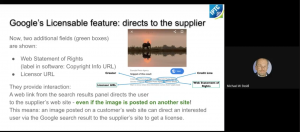 Michael Steidl, Lead of the IPTC Photo Metadata Working Group, spoke on a workshop panel at the Perpignan Photojournalism Conference “Visa Pour L’Image”.
The panel session was pre-recorded and released this week.
This joint workshop from Google, IPTC and Alamy covers some product updates from Google Images, including Image Rights Metadata and the new features on Google Images highlighting licensing information for images that we announced earlier this week. The speakers share best practices and experience on these features.
The speakers are:
- John Mueller, Google Senior Webmaster Trends Analyst
- Michael Steidl, IPTC working group lead
- Roxana Stingu, Alamy SEO Head
The IPTC is very happy to announce that as a result of our collaboration with Google and CEPIC, Google Images’s new licensable badge and other related features are now live.
This means that when photo owners include a photograph’s Web Statement of Rights (also known as Copyright Info URL) in an image’s embedded metadata, Google will display a “Licensable” badge on the image in Google Images search results and the image will appear when the “View all images with Commercial or other licenses” filter is selected. If the Licensor URL is also added, Google will feature a “get this image on” link that takes users directly to a page on the photo owner’s site enabling the user to easily obtain a license to re-use the image elsewhere.
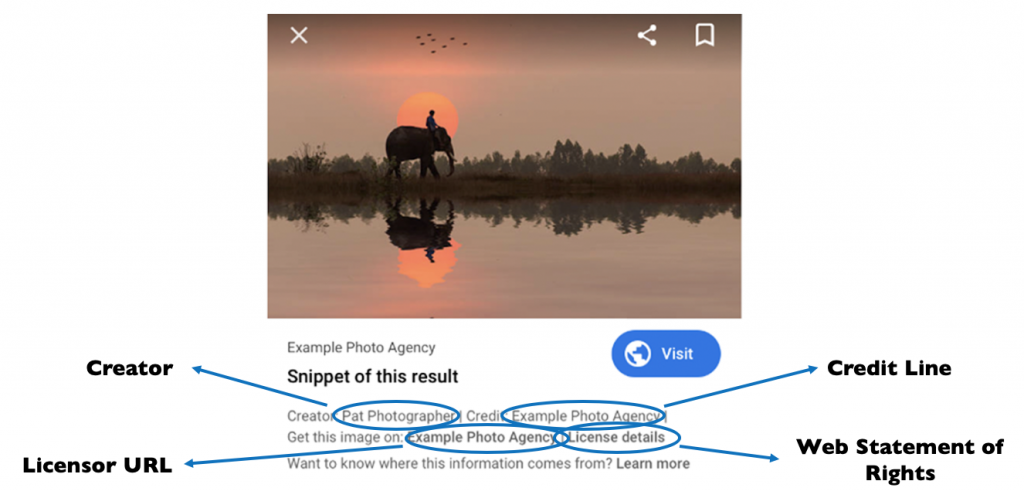
The launch on Google Images comprises three different components:
- “Licensable” badge on image search results for images that have the required metadata fields
- Two new links in the Image Viewer (the panel that appears when a user selects an image result) for people to access the image supplier’s licensing information, namely:
- A “License details” link. This directs users to a page defined by the image supplier explaining how they can license and use the image responsibly
- A “Get this image on” link, which directs users to a page from the image supplier where users can directly take the necessary steps to license the image
- A “License details” link. This directs users to a page defined by the image supplier explaining how they can license and use the image responsibly
- A Usage Rights drop-down filter in Google Image search results pages to support filtering results for Creative Commons, commercial, and other licenses.
“As a result of a multi-year collaboration between IPTC and Google, when an image containing embedded IPTC Photo Metadata is re-used on a popular website, Google Images will now direct interested users back to the supplier of the image,” said Michael Steidl, Lead of the IPTC Photo Metadata Working Group. “This is a huge benefit for image suppliers and an incentive to add IPTC metadata to image files.”
The features have been in beta since February, and after extensive testing, refinement and discussion with IPTC, CEPIC and others, Google is rolling out the new features this week.
As we describe in the Quick guide to IPTC Photo Metadata and Google Images, image owners can choose from two methods to enable the Licensable badge and “Get this image” link: embedding IPTC metadata in image files, or including structured schema.org metadata in the HTML of the web page hosting the image.
Of the two approaches, using embedded IPTC metadata has two benefits. Firstly, the embedded metadata stays with the image even when it is re-used, so that the Licensable badge will appear even when the image is re-published on another website.
Secondly, the “Creator”, “Copyright” and “Credit” messages are only displayed in search results when they are declared using embedded IPTC metadata.
“The IPTC anticipates that this will lead to increased awareness of image ownership, copyright and licensing issues amongst content creators and users,” said Brendan Quinn, Managing Director of IPTC. “By providing direct leads to image owners’ websites, we hope that this leads to increased business for image suppliers both large and small.”
The Google announcements can be found here:
We are excited to announce that the result of our latest collaboration with Google has been launched in a beta phase: Licensable Images.
This feature, that Google is exploring with this beta, will enable image owners not only to receive credit for their work but also to find ways to raise people’s awareness of licensing requirements for content found via Google Images.
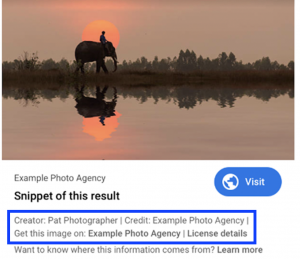
By embedding IPTC Photo Metadata fields into their images (or using schema.org markup), Google will place a badge on licensable images in search results pages.
Under the image preview, Google will show embedded rights metadata (creator, copyright and credit fields). These have been displayed since IPTC’s collaboration with Google in 2018, but will now be given more prominence.
Along with the rights metadata, Google will now show links to the image’s usage licence and also a link to “Get this image”.
See the image for a mockup of how it might look.
By embedding IPTC Photo Metadata into your images, these links will be shown for images on your own website and also when your customers publish images on their sites.
Along with the photo industry organisation CEPIC, IPTC has been working with Google on this project since the IPTC Photo Metadata Conference at CEPIC Congress in June 2019.
The user-facing side of the feature is planned to launch in the next few months. Google has released some developer documentation to encourage image owners to get ready for the launch.
Learn how to make licensable images work for your image collections
For IPTC members, we will be running a webinar today, Thursday 20 February at 15:00 GMT.
The webinar will explain how the licensable images feature works and what image owners can do to get ready for the launch.
The speakers will be Michael Steidl, Lead of the IPTC Photo Metadata Working Group, and Brendan Quinn, Managing Director of IPTC.
Please check your email for the announcement and information on how to join.
For non-members, we will be publishing a page on this site on Friday 21 February that will explain how to take advantage of the feature.
UPDATE: We have now updated our Quick Guide to IPTC Photo Metadata and Google Images to include information on how to embed rights and licensing metadata in your images.
We’re very pleased to see this launch. We look forward to seeing how our members will use this feature to draw more attention to the importance of image rights and licensing.
To support the work of IPTC in this and other areas, please consider joining IPTC.
IPTC is pleased to release a new version of its widely used Photo Metadata Standard, version 2019.1. This version introduces the exciting new feature to mark regions within an image using embedded metadata, directly in the image file.
Any existing or future IPTC Photo Metadata field can now be attached either to the image as a whole, or to an IPTC Image Region defined within the image.
“IPTC has received many requests from photographers and photo businesses for enabling them to set a region inside an image and to apply specific metadata to it, with the new version of the standard this can be done,” said Michael Steidl, Lead of the IPTC Photo Metadata Working Group. “We hope IPTC Image Regions will be supported by imaging software soon.”
What can IPTC Image Regions be used for?
IPTC Image Regions can be used for many purposes:
- An IPTC Image Region can be used to recommending an area of particular interest in an image to be retained after cropping.
- A photographer or picture editor can use IPTC Image Regions to specify the area to be used if a crop of a different shape is required, such as a square cropping in a landscape shot.
- An IPTC Image Region can frame people in an image, using associated metadata from other fields in the standard attached to only that region, such as Person Shown. This opens up the possibility of news stories avoiding tired “from left to right: Jo Smith, Bill Jones, Susan Bloggs…” image captions. Now we have the ability to embed the names and details of people directly on the region relating to that person, so tools could display people’s names when a user’s pointer hovers over their faces.
- IPTC Image Regions can be used to highlight products, artworks, or locations depicted within an image.
- Another attractive feature of image regions is to identify the copyright owners of multiple photos integrated into a single composite image.
- AI systems identifying objects, text, products and people in images no longer have to include the region information in sidecar files distributed with images. Using IPTC Image Regions, the information can be embedded within the image file itself.
There are many more possible use cases. We are looking forward to seeing applications of IPTC Image Regions that we haven’t even thought of!
What shapes are supported?
According to the Specification, an IPTC Image Region can take the shape of a rectangle, a circle or for more complicated shapes, a polygon with any number of vertices may be used.
Dimensions of image regions can be specified in absolute (pixels) or relative (percentage) formats, and the Specification describes how software should retain IPTC Image Region information so that it is still meaningful after the image is cropped or transformed.
Image types and roles
To help with depicting different types of information using IPTC Image Regions, we have created two fields: Image Region Type and Image Region Role.
- Image Region Type asserts the type of content of the region, denoting whether the image region shows a person, animal, bar code, product etc.
- Image Region Role asserts what the region is used for. Examples might be to specify a recommended cropping area, a sub-image inside a composite image, the main subject to be used for cropping and focus purposes, or a region with special copyright information.
We have created controlled vocabularies that can optionally be used to populate both of these fields and we maintain them as part of the IPTC NewsCodes: Image Region Type and Image Region Role. The IPTC NewsCodes Working Group and Photo Metadata Working Groups may add terms to these vocabularies over time.
What metadata can be added to an IPTC Image Region?
In addition to Image Region Type and Role, any of the existing IPTC Photo Metadata fields can be used to describe an IPTC Image Region. Examples of fields that may be useful to attach to a region are:
- Persons Shown (for name only)
- Person Shown with Details (which supports name and also identifier such as a Wikidata or IMDB ID, controlled vocabulary entries and description)
- Organisations Featured
- Product Shown
- Artwork or Object Shown
- Location Shown (for example, a photograph of a mountain range taken from a distance)
This well organised structure of information about a region in an image can also help software makers to show the boundary of regions and associated metadata at the click of a button.
Help for users and for implementers
Users interested in exploring how IPTC Image Regions can be used can find more in a section about it in the IPTC Photo Metadata User Guide. Some examples are already available showing how an image with regions looks and how they can depict different types of information.
For implementers wanting to support IPTC Image Regions in their software tools, all definitions of the Image Region can be found in the IPTC Photo Metadata Standard specification document. The Specification includes detailed information show to express an image boundary correctly and how to include deliberately used metadata fields describing the content of a region.
Software support
Thanks to Phil Harvey, exiftool has supported IPTC Image Regions since version 11.74. The full source plus Windows and Mac OS packages can be downloaded from https://exiftool.org/.The CPAN version of exiftool does not yet support IPTC Image Regions.
We will link to other software supporting IPTC Image Regions as they become available.
Interested in more information?
- The full specification for IPTC Photo Metadata Standard 2019.1 including IPTC Image regions is available from https://www.iptc.org/std/photometadata/specification/IPTC-PhotoMetadata
- A more user-friendly Photo Metadata User Guidelines can be accessed at https://www.iptc.org/std/photometadata/documentation/userguide/
- See a demo using some example files with marked regions at https://www.iptc.org/std/photometadata/examples/image-region-examples/
- The controlled vocabularies for Image Region Type and Image Region Role can be accessed as part of the IPTC NewsCodes.
Questions, comments, ideas?
We welcome your ideas, thoughts and especially implementations!
Please get in touch via the contact form on this site.
A clear majority of professional photo businesses in Europe and North America find IPTC photo metadata highly relevant to their business. That is the message received by IPTC from its 2019 photo industry supplier survey.
According to survey results, eight out of ten photo supplier companies say that data describing images and supporting searches by users is most relevant. Eight out of ten photographers say that metadata to express ownership and usage rights is most important.
These trends are shown by a survey among photo professionals conducted by IPTC, the maker of the industry standard for embedding descriptive, rights information and administrative metadata into images. The 2019 IPTC Photo Metadata Survey results were made public on 14 August 2019 and can be downloaded from the iptc.org website.
“We know that taking the time to apply photo metadata is an investment by photo businesses, so it’s good to see that they get a return,” said Michael Steidl, lead of IPTC’s Photo Metadata Working Group. “Still, we are pleasantly surprised by the importance that photo businesses give to metadata.”
The survey investigated how and why IPTC photo metadata are used in 2019, and more than 100 supplier companies and photographers from many European countries and the USA participated. Most respondents to the supplier survey are companies active in the stock images business, but IPTC also received responses from companies dealing with news photos, cultural heritage images and video footage. The primary business areas of photographers are stock images and public relations photos.
The main reason for applying descriptions of what is depicted in an image are for supplier companies business needs, primarily to help users or customers to find an image they are looking for. Businesses apply rights and licensing data primarily because of legal requirements, but also to protect their companies revenue streams. Administrative data are added to satisfy customer needs.
For photographers, rights are of critical importance
The use of rights data by photographers is more driven by their own business needs than by legal requirements. As photographers are the first party in the supply chain of images they have a high interest to claim who is the creator and the first copyright owner of each creative work. Applying descriptions of the image is driven by customer needs and business needs of photographers. Why administrative data is applied comes also from their business needs and much less from customer needs compared to supplier companies.
IPTC photo metadata – used since 1995
The IPTC photo metadata standard originated in 1995 when Adobe and other makers of image software adopted the IPTC Information Interchange Model (IIM) standard for the panels with fields describing what an image shows, providing the name of the photographer, stating copyright and usage terms, and sharing instructions and more administrative information. In 2005 IPTC published its first Photo Metadata Standard covering fields used by photo professionals and expressed by the IIM format and the then-new XMP format. The IPTC fields were substantially extended in 2008 and since then the standard has been continuously maintained by IPTC, the global standards body of the news media.
For more information, download the full analysis of supplier survey results as a PDF.
Recently conversations on Twitter and various blogs and news sites have reported on Facebook’s use of IPTC embedded photo metadata fields to “track users”. (Reddit.com: “Facebook is embedding tracking data inside the photos you download”, The Australian: “Facebook pics tracking you”, Forbes: “Facebook Embeds ‘Hidden Codes’ To Track Who Sees And Shares Your Photos”, Financial Express: “Beware! Facebook embeds tracking data inside photos you download”).
As the creators and maintainers of the IPTC Photo Metadata Standard, we want to clarify a few points and share our own analysis of the situation.
In Spring 2019, IPTC’s Photo Metadata Working Group conducted our latest round of tests regarding how various social media platforms deal with metadata embedded in uploaded and shared images. The 2019 test results show how Facebook treats image metadata: in IIM and EXIF formats, a few fields are retained related to claiming rights while all others are removed, and in the XMP format all fields are removed.
While this was a small improvement compared to the previous IPTC test in 2016 when all Exif fields were removed, we did not rate Facebook with a “green dot” showing compliance with IPTC standards, as removing metadata embedded by the owner of an image contradicts IPTC’s strong support for keeping metadata persistent.
In addition, in both the 2016 and 2019 tests the Working Group found that two fields in the IIM format do indeed appear to be given values populated by Facebook.
IPTC looks at the facts
IPTC provides a reference image for each version of its Photo Metadata Standard which contains a test value for every specified metadata field. This makes it easy to test which fields are removed or modified.
The reference image of the 2017.1 version of the standard was uploaded to Facebook by the Working Group member David Riecks and it can still be seen here. Next the group used the IPTC’s Get IPTC Photo Metadata website tool for retrieving embedded metadata of most of the images shown on the web. Anyone can use this tool: simply fill the URL of the image into the site’s form and click to see all the metadata embedded in the image.
This test was performed using the URL of the IPTC reference image uploaded to Facebook and the result was shown instantly:

- Embedded metadata fields in the IIM format related to rights were retained: Creator, Creator Job Title, Copyright Notice, Credit Line, Source and Description Writer.
- All embedded metadata using the XMP format were removed by Facebook.
- The Creator and the Copyright Notice in the Exif format were also retained.
- The Instructions field and the Job Id field in IIM show values significantly different from what had been uploaded. The IPTC Working Group assumes these values were inserted by Facebook:
- The value of the Instructions field starts with FBMD. The IPTC Working Group retrieved this image using “Save As…” and another Facebook user uploaded it to his account. Result: the value was not changed during the second upload to Facebook. These results were shown for the re-uploaded image.
- The value of the Job Id fields looks like a unique identifier. If an uploaded image is downloaded using the Save As function and then uploaded by another Facebook user this field contains a different value.
- The IPTC Working Group searched for any documentation of these inserted values but found no specification or statement from Facebook. There have been, however, many guesses and assumptions by users and developers.

Using the Get IPTC Photo Metadata site anybody can check what Facebook values were applied to her or his photo. As a user, you can find Facebook image URLs by clicking on the image on the Facebook site and using the “Copy image address” or the “Inspect” or “Inspect Element” function of your web browser, you should then see the URL.
IPTC’s summary
IPTC tests showed when a Facebook member uploads an image to the Facebook system it removes a lot of fields, keeps only a few related to rights and replaces or adds values to the Job Id and the Instructions fields. The role of these values is not publicly documented by Facebook, so they are currently the subject of significant speculation.
IPTC makes no assumptions about what the metadata values are used for, but Facebook appears to keep the value of the Instructions field constant even when the image is re-uploaded by another user. The Job ID field on the other hand changes with each separate upload.
Our recommendations are that all embedded metadata values should be retained by platforms and that no platform should be overwriting user metadata.
IPTC’s 2019 Social Media Platforms survey also looked at the metadata usage of other major social media platforms. Interested parties can find more information at Social Media Sites Photo Metadata Test Results 2019.
Technical notes
The example metadata values embedded into the 2017.1 reference image can be checked by going to https://getpmd.iptc.org and clicking on the green button in Option A labeled Get Photo Metadata of Web Image. No image URL is required, as by default the metadata of this reference image is retrieved and displayed.
For those interested in the technical details of embedded photo metadata, the technical formats IIM and XMP are introduced in the IPTC Photo Metadata User Guide, including a look under the hood of image files.